

A roundup that crowns a single “best” app is mostly noise. The better question is which one fits the way you actually read. Below are seven trackers worth a look on iPhone in 2026 — listed alphabetically, not ranked — with what each does well and where it falls short. One of them, Kiveo, is ours; we’ve tried to hold it to the same honest standard as the rest.
A quick map before the list. If you love data, look at StoryGraph. If you want reading to feel like a habit you’re building, look at Bookly or Bookmory. If book clubs and a social feed are the point, Fable is built around that. If community and the biggest catalog matter most, Goodreads is still hard to beat. If you want something private and native to Apple, look at Book Tracker. And if you want a calm, unhurried space with no scoreboard, that’s the lane we built Kiveo for.
Book Tracker
A native, privacy-first cataloging app for people who live inside the Apple ecosystem. Built by an indie developer, it runs on iPhone, iPad, Mac, and Apple Watch, syncs through your own iCloud, and asks for no account at all.
Best for: Apple users who want their whole library in one private, well-organized place.
Pros
- No account, no ads, no third-party tracking — your data stays in your iCloud.
- Genuinely deep Apple integration: widgets, Live Activity, Siri Shortcuts, and an Apple Watch timer.
- OCR quote capture (snap a page, get the text), a lending tracker, and CSV/PDF export.
- Imports from Goodreads and several other apps, so switching is quick.
Cons
- Apple-only. No Android, no web — if you ever leave the ecosystem, your data doesn’t follow.
- Cataloging depth comes with a learning curve; it’s more “personal database” than casual log.
Platform & price: iPhone, iPad, Mac, Apple Watch. Free with a limited library; a one-time purchase (around $15.99) unlocks everything. No subscription.
Bookly
The habit coach of the group. Bookly is built around the act of reading: you start a timer when you open a book, stop it when you close it, and the app turns those sessions into reading speed, pace, and finish-time predictions.
Best for: Goal-driven readers who are motivated by streaks, badges, and seeing the numbers move.
Pros
- Excellent session timer with detailed stats and shareable end-of-book infographics.
- Multiple goal types at once (daily minutes, monthly hours, yearly books) plus ambient reading sounds.
- Strong, opt-in gamification — achievements and challenges that some readers genuinely find motivating.
- Quote and note capture, plus playful extras like spice/trope ratings.
Cons
- The free tier caps you at 10 books and shows ads; you’ll likely need Bookly Pro to use it long term.
- Mobile-only (no web), and the gamification that motivates some readers feels like pressure to others.
Platform & price: iOS and Android. Free (10-book cap, ads); Bookly Pro runs about $30/year (or $19.99 for six months).
Bookmory
A calmer, journal-leaning tracker whose signature is a calendar that shows the cover of whatever you read each day. It’s offline-first, needs no account, and leans toward reflection over discovery.
Best for: Readers who want a beautiful, low-pressure visual record of their reading.
Pros
- The cover-calendar is genuinely lovely and makes irregular reading feel rewarding.
- Generous free tier — unlimited books, with most core features available.
- Reading timer, OCR quote capture, a real notes editor, series/collections/tags, and clean stats.
- Tracks physical books, ebooks, and audiobooks; works fully offline.
Cons
- The free version shows some ads, and a few users report occasional instability.
- No real social or recommendation layer — by design, but worth knowing if you want discovery.
Platform & price: iOS, Android, and macOS. Free with ads; Premium (around $3.49/month) unlocks themes and advanced analytics.
Fable
The most social app on this list. Fable is built around book clubs — roughly a hundred thousand of them, led by authors, BookTokkers, celebrities, and regular readers — plus a feed, an in-app ebook reader, and even TV-show clubs. Now part of Scribd’s Everand following a 2025 acquisition.
Best for: Readers who want reading to be communal — discussion, clubs, and a social feed.
Pros
- A genuinely deep book-club experience: spoiler-free chapter rooms, buddy reads, and in-book annotation you can share.
- A lively, Instagram-like feed with reviews, half-star ratings, expressive tags, and monthly Reading Wraps.
- Reading goals, streaks, reminders, and a “For You” feed with Scout recommendations.
- Imports from Goodreads and Kindle; thousands of free public-domain titles plus a large ebook store.
Cons
- The social layer can overwhelm the tracking, and the interface takes some getting used to.
- Club engagement is hit or miss — big membership counts, often thin discussion.
- Many celebrity clubs and the full “social reading” experience sit behind purchases or Fable Plus; it’s now a corporate product with the bundle push that brings.
Platform & price: iOS, Android, web. Free to join and use core features; Fable Plus subscription adds tools and deeper insights, and ebooks are bought individually.
Goodreads
The incumbent. Owned by Amazon since 2013, Goodreads has the largest book database and review archive anywhere, plus a community no one else can match in size. In 2025–2026 it finally shipped its first redesign in two decades and — at long last — a Did Not Finish shelf.
Best for: Readers who want the biggest community and reviews, especially Kindle users.
Pros
- Unmatched catalog and review archive; almost every book is already in it.
- The largest social community: friends’ activity, reviews, giveaways, author Q&As.
- The annual Reading Challenge (now with seasonal badges) is a genuine draw.
- Deep Kindle integration — update progress and rate straight from the device.
Cons
- The interface still feels dated, and recommendations often miss despite your history.
- Free, but ad-supported and woven into Amazon’s ecosystem; privacy-minded readers tend to look elsewhere.
- Whole-star ratings only, and the social layer can get in the way if you read solo. If that’s the part you want gone, here are some Goodreads alternatives without the social pressure.
Platform & price: Web, iOS, Android. Free (ad-supported).
Kiveo
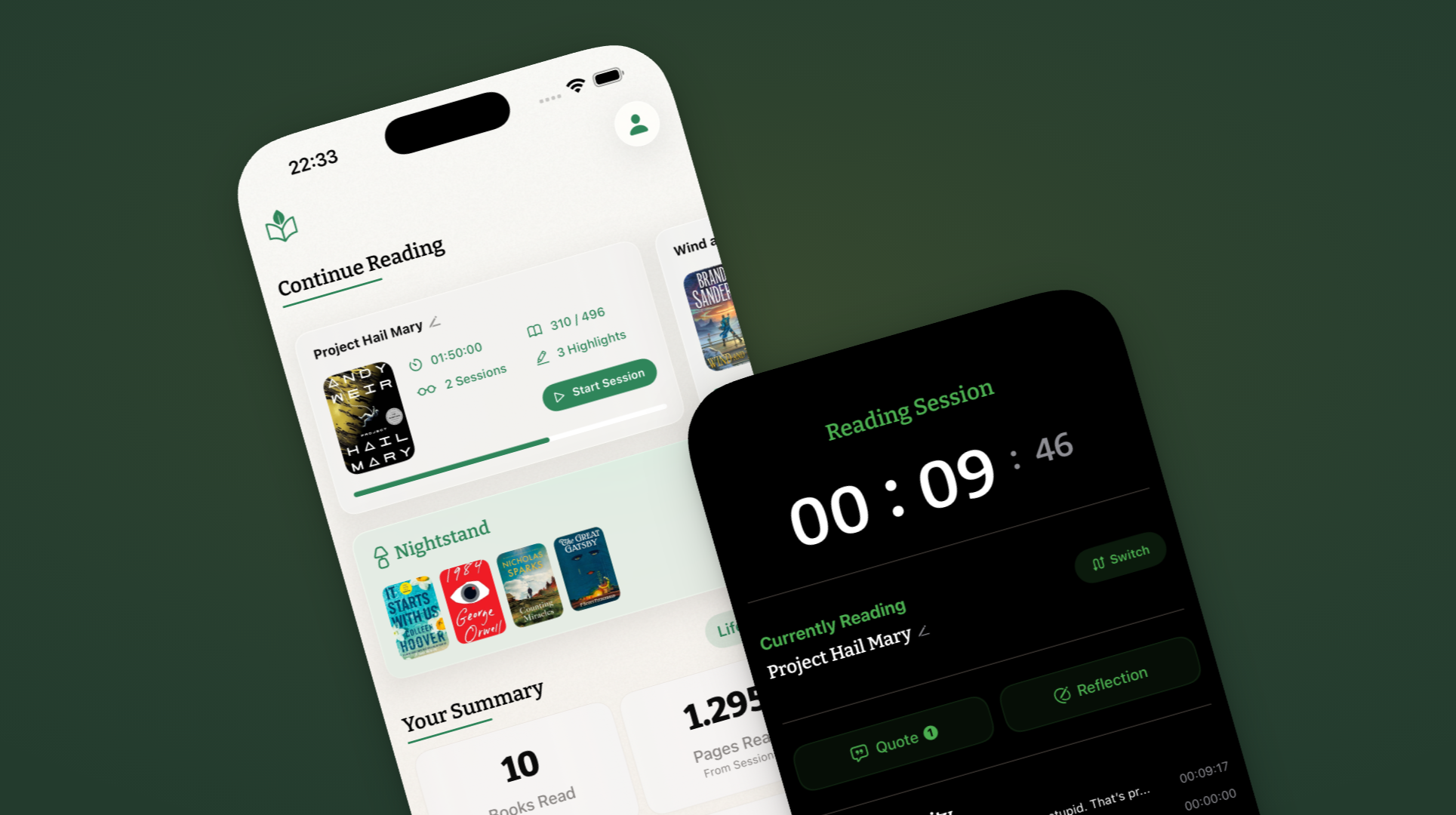
Our app, included here on the same terms as everyone else. Kiveo is a calm, private reading companion for people who’ve outgrown the noise — no feed, no scoreboard, no pressure. It’s the quiet end of this list on purpose.
Best for: Readers who want an unhurried, private space to track reading and keep what stays with them.
Pros
- Deliberately calm: a simple day counter with no guilt mechanics, no leaderboards, no social performance.
- Live Sessions with a Live Activity, Reflections and Quotes, a focused Nightstand reading queue, and DNF/Paused states without stigma.
- Private by default, no ads
- Barcode scanning to add books quickly.
- Goodreads CSV import.
Cons
- iPhone-only today — Android and a web app with sync are on the roadmap but not here yet.
- No social or community features, if that’s what you’re after.
- Younger than the incumbents, so the feature set is still growing.
Platform & price: iOS. Free to use, with an optional Tip Jar to support development (which unlocks a set of exclusive app icons).
StoryGraph
The data-lover’s choice and the app most people mean when they say “Goodreads alternative.” Independent and Amazon-free, StoryGraph tracks books by mood and pace rather than just genre, and its stats pages are the best in the category. Its iOS app won a 2025 App Store Award, and it passed five million readers in January 2026.
Best for: Readers who want rich analytics and recommendations that aren’t driven by what’s popular.
Pros
- The deepest stats and visualizations of any app here, plus mood/pace-based recommendations.
- Content warnings, half- and quarter-star ratings, and buddy reads.
- Independent and Amazon-free, with a public roadmap; recommendations run on your reading, not generative AI.
- One-tap Goodreads import.
Cons
- The social/community side is thin compared with Goodreads.
- An account is required and your data lives on StoryGraph’s servers; for stats-skeptics it can feel like a lot.
Platform & price: Web, iOS, Android. Free tier is genuinely usable; Plus is about $4.99/month (roughly $50/year) for advanced stats and custom charts.
How to actually choose
Most of these apps will happily hold a list of what you’ve read. The difference is what they ask of you while you do it.
If you want to understand your habits in detail, StoryGraph is the most rewarding. If you want reading to feel like a streak you’re keeping, Bookly and Bookmory are built for that — Bookly leans competitive, Bookmory leans gentle. If reading is social for you — clubs, discussion, a feed — Fable is the one. If community and catalog matter above all, Goodreads still wins on sheer size. If you want everything private and native to Apple, Book Tracker is the most thorough. And if the whole point is to read without a scoreboard, that’s the reason Kiveo exists.
The best tracker is the one you’ll still open in three months. Pick the one whose idea of reading sounds like yours — and if that’s a quieter one, see how Kiveo works or compare it side by side.
Prices and features change often. We refresh this guide twice a year — last updated July 2026.