

Most book quotes get lost in the same few places: a camera roll, a notes app, the margin of a book you’ve since lent to someone. An app built for quotes fixes that, and there are more of them than you’d expect.
The good news is that reading a page with your phone’s camera is no longer the hard part. Every app below can do some version of it. What separates them is what happens to a quote after you save it: whether it stays tied to its book, whether you can get it back out, and what the app asks of you in return.
Capturing a quote is the easy part now. The real difference is where it lives afterward.
Below are six apps for saving book quotes in 2026, listed alphabetically rather than ranked, with what each does well and where it falls short. One of them, Kiveo, is ours. We’ve held it to the same standard as the rest.
Bookly
A reading habit tracker that handles quotes well. Bookly is built around timed sessions, and quotes live inside them: while the timer runs, you can save a line, a thought, or a word to look up, each with its page.
Best for: Readers who already time their sessions and want quotes captured in the same place, mid-read.
Pros
- Quotes, thoughts, and new words all saved from the session screen, with page numbers.
- Photo-to-text capture from paper books and screenshots.
- Favorites and tags for finding a line later.
Cons
- The free tier caps your library at 10 books and shows ads, and extras like image quote cards sit behind Bookly Pro.
- Quotes are one feature among goals, achievements, and challenges. If you want a quiet place for quotes, it can feel busy.
Platform & price: iOS and Android. Free (10-book cap, ads); Bookly Pro is about $30/year.
Clippit
The only Android-only app here, and free in the plainest sense. Clippit is a side project from a small group of friends who read: take a photo of a page, drag a highlighter over the lines you want, and it turns them into text on your device.
Best for: Android readers who want a simple quote collection with no account and nothing to pay.
Pros
- No ads, no subscription, no in-app purchases, no login.
- Three ways in: a photo of the page, an image from your gallery, or typed text.
- Tags and a filter for finding clippings, plus sharing as text or an image.
Cons
- Android only. There’s nothing for iPhone.
- It’s spare. Organization stops at tags, and it keeps the text rather than the photo, so checking a tricky scan (poetry line breaks, for example) has to happen in the moment.
Platform & price: Android. Free.
Highlighted
The most complete dedicated quote app on iPhone. Built by an independent developer, Damir Štuhec, Highlighted is focused on capturing passages from physical books, and it does that very well: it detects whole sentences, picks up the page number, and can select text you’ve already underlined on the page. If we had to point a paper-book reader somewhere first, it would be here.
Best for: Readers of physical books who want fast, accurate capture and a deep, searchable archive.
Pros
- Excellent text recognition, with sentence and page number detection.
- Tags, notes, favorites, and collections, with search and filters across everything.
- Imports Kindle highlights and CSV files, and exports everything in bulk in several formats.
- Reminders and Home Screen widgets that bring old passages back.
Cons
- The core is free, but some features sit behind Highlighted+, a subscription at $44.99 a year.
- Apple only. Its privacy label lists your email and saved highlights as data linked to you, which is worth a look if that matters to you.
Platform & price: iPhone, iPad, Mac (Apple silicon), and Vision Pro. Free core; Highlighted+ is $44.99/year, with an optional $2.99/month supporters’ club.
Kiveo
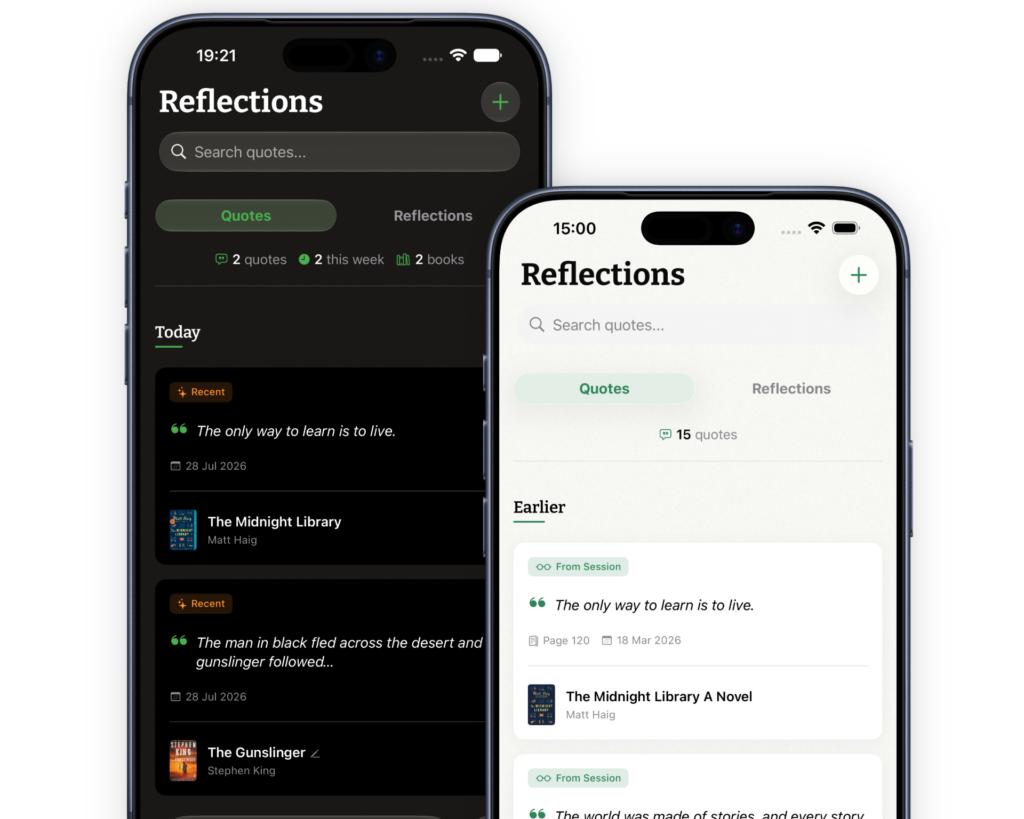
Our app, included on the same terms as everyone else. Kiveo isn’t a quote app first: it’s a private reading journal where quotes sit alongside your sessions, shelves, and reflections.
Best for: Readers who want their quotes kept with their books, in a quiet space nobody else can see.
Pros
- Type a quote, or point your camera at the page and select the words the way you’d select text anywhere on your phone.
- Each quote keeps its book, page number, and date, with room for an optional reflection on why it stopped you.
- Search across every quote and reflection, plus sharing cards for passing a line on.
- No account, no ads, end-to-end encrypted across iPhone and iPad, and export whenever you like.
Cons
- iPhone and iPad only.
- No Kindle highlight import.
- Quotes don’t come back to you on their own — yet 😉 . You go to them.
Platform & price: iPhone and iPad. Free, with an optional Tip Jar that unlocks a set of illustrated app icons.
QOTD
Short for “quote of the day,” and named after its best idea. QOTD scans quotes from a page or a screen, files them in folders you create, and sends one back to you at random, up to three times a day. Your own collection does the work a quote-of-the-day app usually does with strangers’ lines.
Best for: Readers who want their saved quotes to resurface on their own, and who’d rather pay once.
Pros
- Paid once, no subscription, and its privacy label says it collects no data at all.
- Fields for author, source, and page number on every quote, plus notes and bookmarks.
- Flexible sharing, including longer quotes split across several images.
Cons
- It hasn’t been updated since January 2022. It still works, but don’t expect anything new.
- Quotes live in folders rather than with their books, and nothing carries over between devices; backup goes through Dropbox.
Platform & price: iPhone and iPad. $7.99, one-time.
Readwise
Less a place to save quotes than the place they all end up. Readwise gathers highlights from Kindle, Apple Books, Kobo, read-later apps, and more, and you can add paper books by photographing the page. Then it sends a selection back to you in a daily review.
Best for: Heavy ebook and article readers who highlight a lot and want it all in one searchable library.
Pros
- The widest set of sources of anything here, gathered automatically once connected.
- A Daily Review in the app or by email, built on spaced repetition.
- On the full plan: tags, notes, and export to tools like Notion and Obsidian.
Cons
- No free tier, only a 30-day trial.
- Built for ebook and web highlights first. Paper books work, but they aren’t its center of gravity.
- The daily review is a commitment, and for pleasure reading it can start to feel like homework.
Platform & price: Web, iOS, and Android. Lite is $5.59/month billed annually; the full plan is $9.99/month billed annually, or $12.99 month to month.
How to actually choose
Every app here can read a page. The better question is where you want a quote to live once it’s saved.
If you mostly read paper books, Highlighted is hard to beat. If your highlights are already in a Kindle or a browser, Readwise gathers them without retyping. If you want quotes to find you, QOTD does that simply, and Highlighted and Readwise do it with more depth. On Android, Clippit is the honest free pick. If you time your reading, Bookly keeps quotes inside the session. And if you’d like each quote kept with its book, in a journal nobody else reads, that’s the reason Kiveo exists.
Whichever you choose, one habit matters more than the app: keep the source with the quote. Title, author, a page if you have it.
If a quieter home for your quotes sounds right, see how Kiveo keeps them. It’s free on the App Store, whenever you’re ready.
Prices and features change often. We refresh this guide twice a year. Last updated October 2026.